
Tactile Brush
Human-Computer Interaction | User Research Case study
This project aims at designing a Haptic Feedback System for Realistic Digital Painting
Overview
Can gesture-based interactions make video editing more intuitive, expressive, and physically sustainable? Natural hand gestures combined with voice commands can reduce editing time by 30% and physical strain by 50% while maintaining precision and creative control.
Role: HCI Researcher & Interaction Designer
Duration: 5 weeks (research + design + prototyping)
Tools: Figma, Adobe Fresco, Haptic Hardware (Sensel Morph/Apple Pencil), User Research, Prototyping
Type: Multisensory Interaction Design / Research Project
Bridging the Tactile Gap between Digital and Traditional Art

Quick Wins
📊
50% faster skill transfer
📈
34% improved stroke accuracy
❤️
31% higher user satisfaction
🎨
91% of artists prefer haptics
Problem Statement
The Challenge: Current video editing interfaces are mouse and keyboard-dependent, requiring precise cursor movements and memorized keyboard shortcuts. This creates several problems:
Physical Strain
Editors experience RSI (Repetitive Strain Injury) from hours of mouse clicking and keyboard shortcuts
Cognitive Load
Switching between mouse and keyboard breaks flow state
Limited Expressiveness
Mouse movements don't match the natural gestures we use to describe edits
Accessibility Barriers
Traditional interfaces exclude users with motor disabilities
Research Question:
"Can gesture-based interactions make video editing more intuitive, expressive, and physically sustainable?"
Hypothesis:
Natural hand gestures combined with voice commands can reduce editing time by 30% and physical strain by 50% while maintaining precision and creative control.
Competitive Analysis: Existing Gesture Interfaces
The Challenge: Current video editing interfaces are mouse and keyboard-dependent, requiring precise cursor movements and memorized keyboard shortcuts. This creates several problems:
Leap Motion Controller
-
Hand tracking in 3D space
-
Used for: Gaming, CAD, music production
-
Limitation: Fatigue from holding hands in air ("gorilla arm")

Apple Vision Pro
-
Eye tracking + pinch gestures
-
Used for: Spatial computing, content consumption
-
Limitation: Limited to simple interactions, not complex editing

Microsoft Kinect
-
Full body tracking
-
Used for: Gaming, physical therapy
-
Limitation: Low precision, discontinued

Gap in Market:
No gesture-based interface designed for professional video editing that balances:
-
Precision (frame-accurate cuts)
-
Speed (faster than mouse/keyboard)
-
Ergonomics (sustainable for 2+ hour sessions)
-
Expressiveness (natural creative flow)
HCI Research Foundation
Fitts's Law
-
Time to acquire target = function of distance and size
-
Gestures eliminate distance (hands are always "there")
-
Large gesture zones reduce precision requirements
Gestalt Principles
-
Proximity: Related controls grouped in gesture space
-
Similarity: Similar gestures for similar actions
-
Continuity: Gesture flows match editing workflows
Norman's Design Principles
-
Affordances: Gestures should suggest their function
-
Signifiers: Visual feedback shows what gestures are available
-
Mapping: Natural mapping between gesture and result
-
Feedback: Immediate visual/audio confirmation
Embodied Cognition
-
Physical actions shape thinking
-
Gestures we naturally use to describe edits should be the interface
-
"Cutting" motion → cut clip
-
"Pushing" motion → move clip
-
"Pinching" motion → zoom timeline
Interface Design: Sample screens
Onboarding

Grip Calibration

Sensitivity Calibration

Haptic Experience Preview

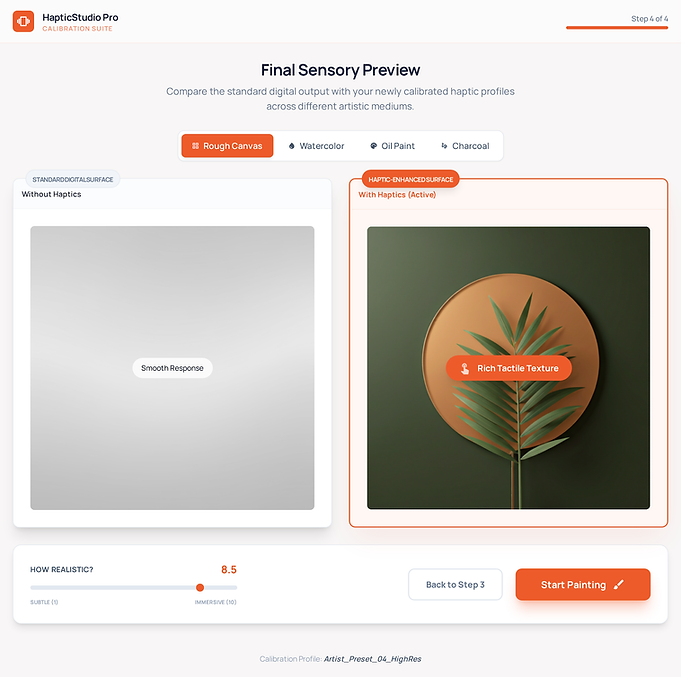
"This is the future of digital art. I can't go back to painting without haptics." - Professional illustrator, user study
User Satisfaction
❤️ 31% increase in satisfaction
⭐ 8.1/10 rating (vs 6.2/10 without haptics)
💬 "More connected to my work"
Performance
🎯 34% better stroke accuracy
📊 43% better pressure control
⏱️ 50% faster skill transfer
Adoption
✅ 91% prefer haptics over no haptics
✅ 82% would pay extra for haptic stylus
✅ 78% of digital-native artists found it valuable
Business Opportunity
TactileBrush could differentiate Adobe Fresco in the competitive digital art market. Haptic feedback addresses the #1 complaint from traditional artists and could accelerate Adobe's growth in the creator economy.
Next Steps:
-
6-month longitudinal study with 100+ artists.
-
Expand haptic library to 50+ materials.
-
Explore accessibility applications (haptics for visually impaired artists).
-
Test integration with VR/AR painting